概要
LangGraphについて勉強したので、
LangGraph+LangChainで簡単な内省型エージェントを作成してみました。
LangGraphの公式ドキュメント
langchain-ai.github.io
前提
環境
今回作成したスクリプトを動かすための環境は以下です
| 項目 | バージョン・内容 |
|---|---|
| Python | 3.12 |
| langchain-core | 0.3.76 |
| langchain-openai | 0.3.33 |
| langgraph | 0.6.7 |
スクリプト作成は以下を参考にさせていただきました。
環境構築
事前にPython環境を整え、必要パッケージをインストールします。
今回はuvを利用しました。
uv init langgraph_tutorials
cd langgraph_tutorials/

uv sync
uv add langgraph
uv add langchain_openai
export OPENAI_API_KEY="sk-xxxx"
エージェントは何が起きたのかわかりにくいためトレースをするためにLangSmithを利用します
APIキーの払い出し、環境変数に設定します。
export LANGSMITH_TRACING=true
export LANGSMITH_API_KEY="lsv2_xxxxxxxx"
スクリプト解説
ステートの定義
Agentで利用するステートを定義します。
ステートは、エージェント内のNode(処理の単位)で更新されます。
エージェントはこのステートを使いまわすことでステートフルに処理を進められます。
class AgentState(TypedDict):
    messages: Annotated[Sequence[BaseMessage], add_messages]
    challenge_count: int
    answer: str
    complete: bool
今回は下記TypedDictを作成しました
messages:会話の履歴を保持するリストchallenge_count:内省ループの回数カウントanswer:最新の回答内容complete:回答が完成したかどうかのフラグ
Annotated[Sequence[BaseMessage], add_messages]についての補足
BaseMessage(HumanMessageやAIMessageなど)のリストに、ステート更新時にadd_messages(メッセージを追加)する処理を行います。
モデル定義
今回は内省処理の結果を判断するため、PydanticParserを利用します。
PydanticParserで利用するためのモデルを定義します。
class Reflection(BaseModel):
    advice: str = Field(..., description="内省結果をアドバイスしてください")
    is_completed: bool = Field(..., description="回答の評価結果")
内省の出力形式をPydanticモデルで定義
advice:回答を改善するための助言is_completed:回答が完成かどうか
エージェント定義
エージェントはclassで実装します
MAX_CHALLENGE_COUNT = 3
class SampleAgent:
    def __init__(self, llm, tools: Optional[list] = []) -> None:
        self.llm = llm
        self.tools = tools
        self.app = self.create_graph()

    def should_continue(self, state: AgentState):
        """継続判断"""
        if state["complete"] or state["challenge_count"] >= MAX_CHALLENGE_COUNT:
            return "end"
        else:
            return "continue"

    def call_model(self, state: AgentState):
        """モデル呼び出し"""
        chain = self.llm
        response = chain.invoke(state["messages"])
        return {"messages": [response]}

    def reflection(self, state: AgentState):
        """内省"""
        parser = PydanticOutputParser(pydantic_object=Reflection)
        format_instructions = parser.get_format_instructions()
        prompt_template = PromptTemplate.from_template(
            "<input>{input}</input>\n"
            "<last_message>{last_message}</last_message>\n"
            "<output_format>{format_instructions}</output_format>\n"
        )
        prompt = prompt_template.partial(format_instructions=format_instructions)
        chain = prompt | self.llm | parser
        response = chain.invoke(
            {
                "last_message": state["messages"][-1].content,
                "input": state["messages"][0].content,
            }
        )

        is_completed = response.is_completed

        return {
            "messages": [response.advice],
            "challenge_count": state["challenge_count"] + 1,
            "complete": is_completed,
        }

    def create_graph(self) -> Pregel:
        """グラフ作成"""
        graph = StateGraph(AgentState)
        graph.add_node("call_model", self.call_model)
        graph.add_node("reflection", self.reflection)

        graph.add_edge(START, "call_model")
        graph.add_edge("call_model", "reflection")
        graph.add_conditional_edges(
            "reflection", self.should_continue, {"continue": "reflection", "end": END}
        )
        app = graph.compile()
        return app

    def run(self, input):
        """グラフ起動"""
        return self.app.invoke(input)
SampleAgentを作成、以下メソッドを定義
call_model:LLMを呼び出して回答を生成reflection:回答を評価・改善する内省処理create_graph:処理のフローをグラフとして定義should_continue:ループの継続条件
ポイント
1.内省処理ではモデルで定義したPydanticPaserを利用します
    def reflection(self, state: AgentState):
        """内省"""
        parser = PydanticOutputParser(pydantic_object=Reflection)
        format_instructions = parser.get_format_instructions()
        prompt_template = PromptTemplate.from_template(
            "<input>{input}</input>\n"
            "<last_message>{last_message}</last_message>\n"
            "<output_format>{format_instructions}</output_format>\n"
        )
        prompt = prompt_template.partial(format_instructions=format_instructions)
        chain = prompt | self.llm | parser
        response = chain.invoke(
            {
                "last_message": state["messages"][-1].content,
                "input": state["messages"][0].content,
            }
        )

        is_completed = response.is_completed

        return {
            "messages": [response.advice],
            "challenge_count": state["challenge_count"] + 1,
            "complete": is_completed,
        }
2.グラフはnodeとedgeで構成されます
分岐などをする場合はconditional_edgesを利用します
最後にコンパイルをすることで呼び出し可能なオブジェクトになります(LangChainのモデルような状態)。
この状態になるとinvokeで起動することができるようになります。
    def _create_graph(self) -> Pregel:
        """グラフ作成"""
        graph = StateGraph(AgentState)
        graph.add_node("call_model", self.call_model)
        graph.add_node("reflection", self.reflection)

        graph.add_edge(START, "call_model")
        graph.add_edge("call_model", "reflection")
        graph.add_conditional_edges(
            "reflection",
            self._should_continue,
            {"continue": "reflection", "end": END}
        )
        app = graph.compile()
        return app
3.MAX_CHALLENGE_COUNTで定義した回数orステートのcompleteがTrueなら処理を終了、そうでなければreflectionを再実行するノード
    def should_continue(self, state: AgentState):
        """継続判断"""
        if state["complete"] or state["challenge_count"] >= MAX_CHALLENGE_COUNT:
            return "end"
        else:
            return "continue"
おまけ
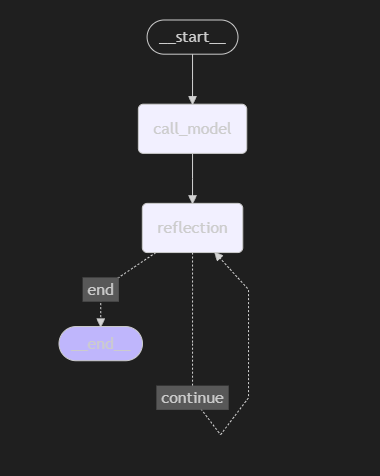
今回作成したグラフを可視化する以下のように図になります。
reflectionがループしていることも確認できます
メイン処理(起動)
最後にエージェントを起動しメッセージを投げる処理を書きます
今回はLLMモデルはChatOpenAIにしました。
async def main():
    llm = ChatOpenAI(model="gpt-4o")
    agent = SampleAgent(llm)
    result = agent.run(
        {
            "messages": "こんにちは~、元気ですか",
            "challenge_count": 0,
            "complete": False,
        }
    )

    print(result["messages"][-1].content)
ステートのプロパティをすべて定義しインプットとしてエージェントに渡します
出力
スクリプトを起動して出力を確認します。
$ uv run main.py
自分の体調や感情を振り返って、それについて感じたことや気づきをメモに取ると良いかもしれません。適度に休息を取ることも大切です。
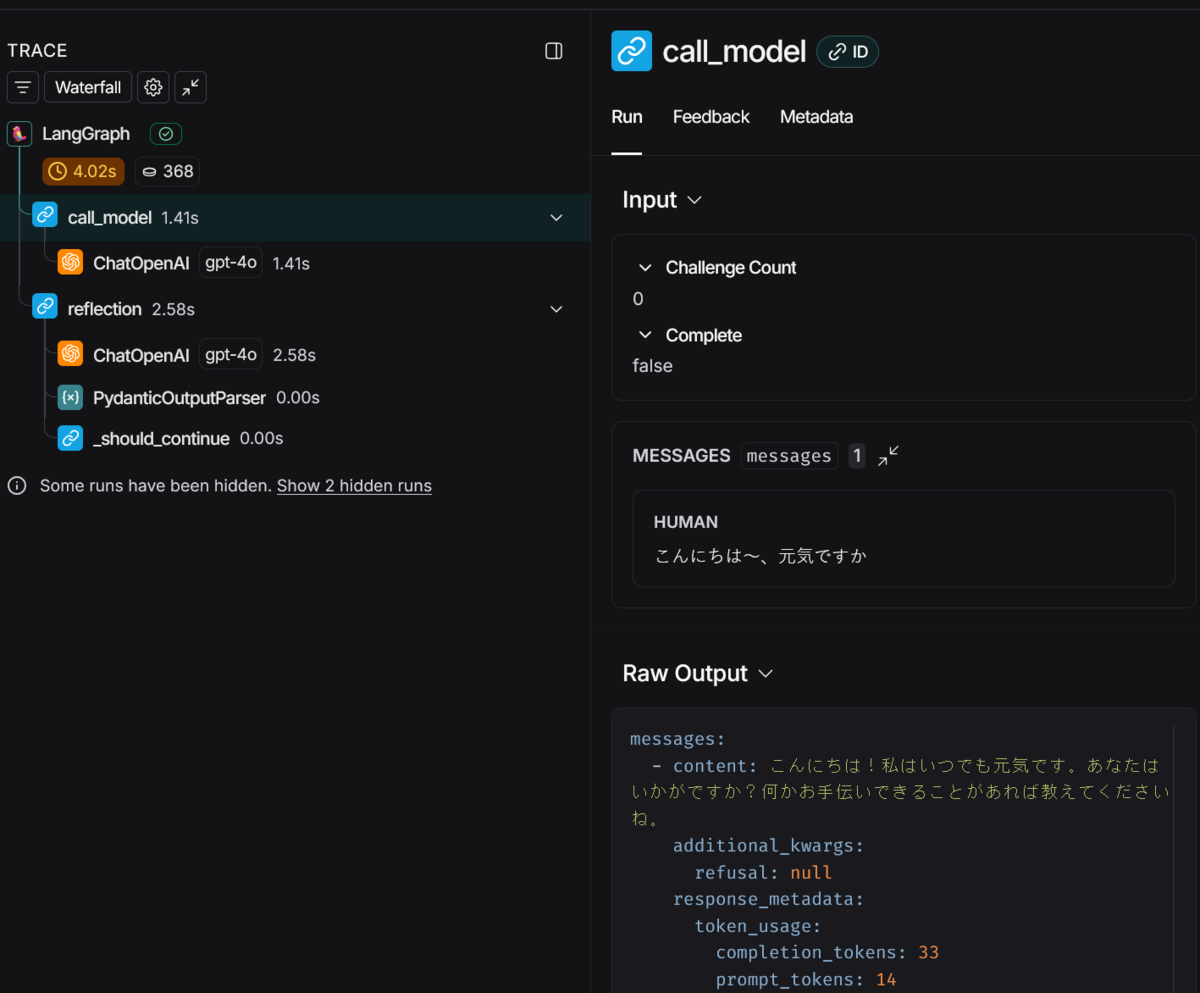
それっぽい出力を返しました。(微妙にずれている) 何が起きたかいまいちわからないのでLangSmithでTraceしてみます
最初はいい感じに回答してくれてます
内省して最終回答だけしたら微妙に回答がかみ合ってない感じになっちゃいました
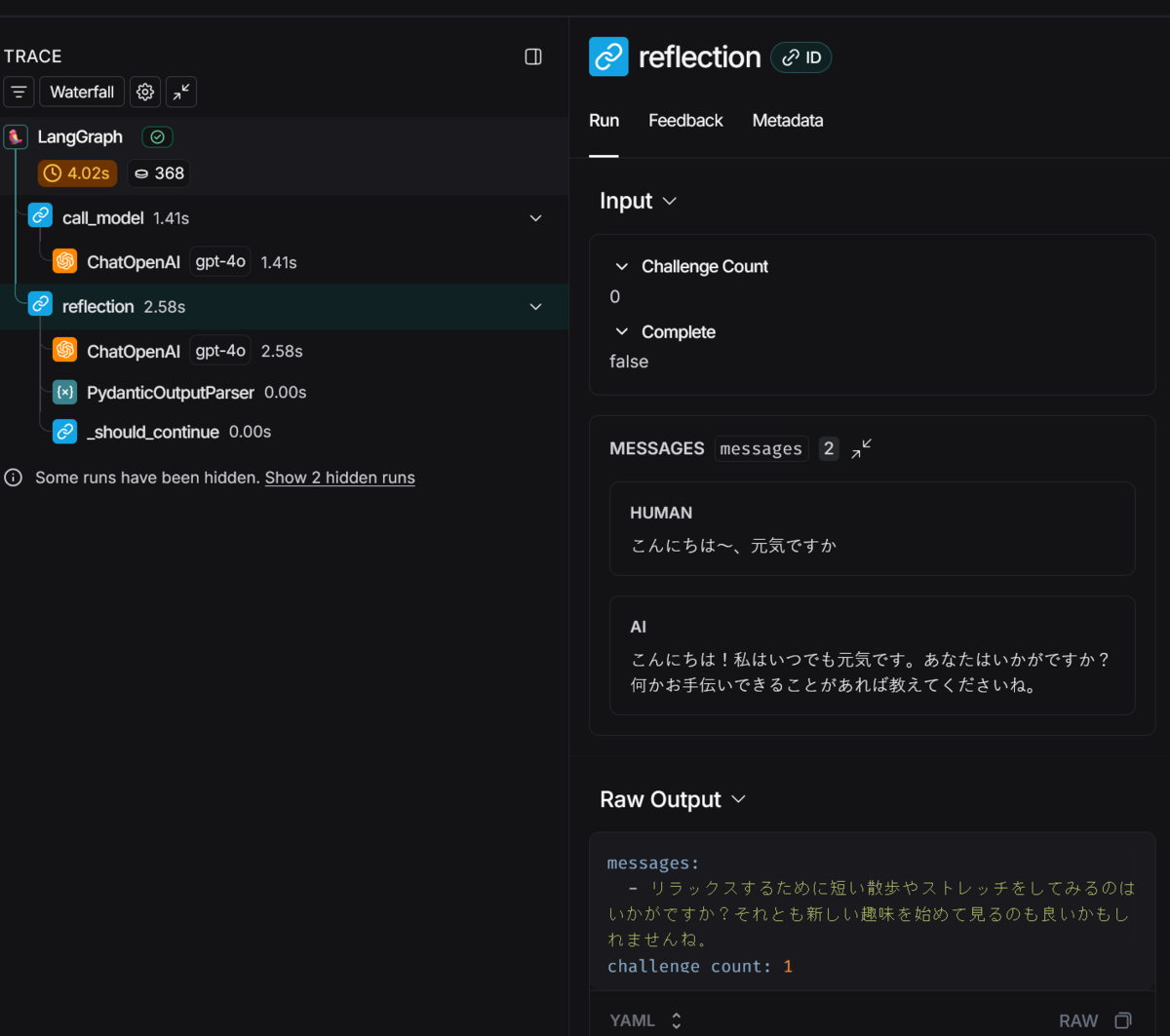
Traceを見ることで、内省処理が動いたことは確認できました。
内省している際のプロンプトは改善の余地がありそうです。
質問が簡単だったため内省のループはしてないですね。。
まとめ
LangGraphとLangChainを組み合わせて反復的な内省エージェントが作れました。
Plan(計画)やToolなどを使っていないのであまりエージェント感がないですが...。
今回は勉強のために自作してみましたがLangGraphにはcreate_react_agentがありもっと簡単にエージェントを作成することもできます。
次回はToolやMCPとの連携を試します。
